What is a packing slip? A complete guide for e-commerce

11 min read

Last updated:

E-commerce merchant checking a packing slip beside two shipping parcels and folded clothing in a warehouse.

In this article

Summary: A packing slip helps e-commerce businesses verify shipment contents, prevent packing errors, and keep order fulfillment organized. Learn what a packing slip should include, how it differs from shipping labels and invoices, and how to create and print one.

A customer places an order. Your team picks the products, packs them, and prepares the parcel for shipping.

Sounds simple, right? But as order volumes grow, so does the risk of packing mistakes, especially when an order contains several products or ships in multiple boxes. Keeping track of the right products, documents, and shipping labels can quickly become a challenge.

That’s where packing slips come in. They help your team check that every parcel contains the right items, reduce packing errors, and keep your fulfillment process organized as your business grows.

In this guide, you’ll learn

  • what a packing slip includes,

  • how it differs from a shipping label, invoice or picking list,

  • and how to keep your packing process running smoothly. #

Let’s break it down.

Packing slips explained: Definition and purpose

A packing slip is a document that lists the products and quantities included in a shipment. It usually travels inside the parcel and helps your team and your customer check what’s inside.

Here’s how that works in practice.

Imagine a customer places an order at your online store:

  • 2 T-shirts

  • 1 pair of jeans

  • 1 jacket

If everything ships in one parcel, the packing slip lists all four items.

But what if the jacket is out of stock and needs to ship separately?

Each parcel can have its own packing slip showing exactly what’s inside. That’s an important distinction: a packing slip reflects the contents of a specific shipment, not necessarily the customer’s entire order.

Your packing team can use it to check that the right products are included before shipping, while customers can use it to see which items they’ve received.

Even when orders are managed digitally, packing slips provide a useful reference during the physical packing process. They help your team verify parcel contents without switching between systems and give customers a clear overview of what they’ve received, especially when orders arrive in multiple shipments.

What does a packing slip look like?

Example of an e-commerce packing slip showing order details, sender and recipient information, product images, SKUs, quantities, and customer notes.

A packing slip typically includes the key information needed to identify an order and verify what’s inside a parcel. Some details are essential, while others depend on your business and the fulfillment process.

What information should a packing slip include?

The essentials are the order number and the details that make each product easy to identify:

  • Order number

  • Product name

  • SKU

  • Variant, such as size or color

  • Quantity ordered

  • Quantity included in the shipment

The most important thing is that your packing slip clearly shows which products and quantities are included in the parcel. Additional details can make the document more useful for your team and customers, depending on how you manage your orders.

The key is to keep the document practical. Your team should be able to scan it quickly and understand exactly what belongs in the parcel.

Additional information (optional):

  • Order date

  • Sender details

  • Customer or recipient details

  • Shipping method

  • Barcode that links the document to the order

  • Branding, such as your company logo

  • Special notes or return instructions

What doesn’t need to be on a packing slip?

A packing slip focuses on what’s inside a shipment, not what the customer paid. That’s why prices, payment details, and billing information aren’t usually included. This is especially useful for gift orders or when the person receiving the parcel isn’t the one who placed the order.

An invoice, on the other hand, typically includes product prices, taxes, discounts, and the total amount due or paid.

That said, businesses can choose to include prices on a packing slip if it suits their fulfillment process.

Packing slip vs. other shipping documents

Several documents are used throughout the fulfillment process, and their names can sometimes be confusing. While some may sound similar, each serves a different purpose.

Here’s a quick overview of how they compare:

Document

Main purpose

Main user

Where it’s used

Packing slip

Shows which products are included in a parcel

Packing team and customer

During packing and when unpacking the parcel

Packing list

Details shipment contents, often including quantities, weights, and dimensions

Shippers, recipients, and logistics teams

During shipping, particularly for B2B and international shipments

Shipping label

Provides the information needed to deliver a parcel

Carrier and shipping team

On the outside of the parcel during shipping

Invoice

Records what was purchased, including prices and payment details

Customer and accounting team

During billing, payment, and bookkeeping

Picking list

Shows warehouse staff which products and quantities to collect

Warehouse and picking team

During the order-picking process

Bill of lading

Documents the goods being transported and the terms of carriage

Shipper, carrier, and recipient

During freight transportation

Let’s look at the differences in more detail.

Packing slip vs. other shipping documents

Packing slip vs. packing list

“Packing slip” and “packing list” are often used to describe similar documents. The main difference is usually the context in which they’re used.

In e-commerce, a packing slip typically accompanies an individual customer order.

A packing list is more common in B2B, wholesale, freight, or larger shipments and may contain more detailed information about cartons, weights, or dimensions.

In everyday e-commerce fulfillment, however, the terms are sometimes used interchangeably.

Packing slip vs. shipping label

A shipping label is designed for the carrier. It contains information such as:

  • Recipient address

  • Sender address

  • Tracking barcode

  • Carrier information

  • Shipping service

The shipping label is attached to the outside of the parcel.

A packing slip is mainly for your fulfillment team and customer. It lists the products inside the parcel and is usually placed inside the package.

Put simply:

Shipping label = where the parcel needs to go

Packing slip = what’s inside the parcel

Packing slip vs. invoice

An invoice is a financial document. It records the commercial transaction and usually includes:

  • Product prices

  • Taxes

  • Discounts

  • Shipping costs

  • Total amount

  • Payment information

A packing slip focuses on the physical contents of the shipment.

That distinction matters when an order is split across multiple parcels. A single invoice may cover the entire order, while each parcel can have its own packing slip.

Packing slip vs. picking list

A picking list is used before packing begins.

It tells your warehouse team which products they need to collect to fulfill one or multiple orders.

A packing slip is used later in the process to check which products belong in a specific shipment.

The difference is simple:

What do we need to collect? → Picking list

What belongs in this shipment? → Packing slip

Packing slip vs. bill of lading

A bill of lading is mainly used in freight and commercial transportation. It acts as a contract and receipt between the shipper and carrier and contains details about the goods being transported.

Packing slips are much simpler. They are primarily used to identify the contents of a parcel or shipment.

For most e-commerce parcel shipments, you’ll work with packing slips and shipping labels rather than bills of lading.

Shipping internationally? A packing slip isn’t a customs document. Cross-border parcels usually need separate customs or commercial documentation, such as a commercial invoice, that tells customs what is in the parcel and what it’s worth. A packing slip only lists the contents. For what to prepare when you ship abroad, see our complete guide to international shipping.

Packing slip vs. other shipping documents

Packing slip vs. packing list

“Packing slip” and “packing list” are often used to describe similar documents. The main difference is usually the context in which they’re used.

In e-commerce, a packing slip typically accompanies an individual customer order.

A packing list is more common in B2B, wholesale, freight, or larger shipments and may contain more detailed information about cartons, weights, or dimensions.

In everyday e-commerce fulfillment, however, the terms are sometimes used interchangeably.

Packing slip vs. shipping label

A shipping label is designed for the carrier. It contains information such as:

  • Recipient address

  • Sender address

  • Tracking barcode

  • Carrier information

  • Shipping service

The shipping label is attached to the outside of the parcel.

A packing slip is mainly for your fulfillment team and customer. It lists the products inside the parcel and is usually placed inside the package.

Put simply:

Shipping label = where the parcel needs to go

Packing slip = what’s inside the parcel

Packing slip vs. invoice

An invoice is a financial document. It records the commercial transaction and usually includes:

  • Product prices

  • Taxes

  • Discounts

  • Shipping costs

  • Total amount

  • Payment information

A packing slip focuses on the physical contents of the shipment.

That distinction matters when an order is split across multiple parcels. A single invoice may cover the entire order, while each parcel can have its own packing slip.

Packing slip vs. picking list

A picking list is used before packing begins.

It tells your warehouse team which products they need to collect to fulfill one or multiple orders.

A packing slip is used later in the process to check which products belong in a specific shipment.

The difference is simple:

What do we need to collect? → Picking list

What belongs in this shipment? → Packing slip

Packing slip vs. bill of lading

A bill of lading is mainly used in freight and commercial transportation. It acts as a contract and receipt between the shipper and carrier and contains details about the goods being transported.

Packing slips are much simpler. They are primarily used to identify the contents of a parcel or shipment.

For most e-commerce parcel shipments, you’ll work with packing slips and shipping labels rather than bills of lading.

Shipping internationally? A packing slip isn’t a customs document. Cross-border parcels usually need separate customs or commercial documentation, such as a commercial invoice, that tells customs what is in the parcel and what it’s worth. A packing slip only lists the contents. For what to prepare when you ship abroad, see our complete guide to international shipping.

Packing slip vs. other shipping documents

Packing slip vs. packing list

“Packing slip” and “packing list” are often used to describe similar documents. The main difference is usually the context in which they’re used.

In e-commerce, a packing slip typically accompanies an individual customer order.

A packing list is more common in B2B, wholesale, freight, or larger shipments and may contain more detailed information about cartons, weights, or dimensions.

In everyday e-commerce fulfillment, however, the terms are sometimes used interchangeably.

Packing slip vs. shipping label

A shipping label is designed for the carrier. It contains information such as:

  • Recipient address

  • Sender address

  • Tracking barcode

  • Carrier information

  • Shipping service

The shipping label is attached to the outside of the parcel.

A packing slip is mainly for your fulfillment team and customer. It lists the products inside the parcel and is usually placed inside the package.

Put simply:

Shipping label = where the parcel needs to go

Packing slip = what’s inside the parcel

Packing slip vs. invoice

An invoice is a financial document. It records the commercial transaction and usually includes:

  • Product prices

  • Taxes

  • Discounts

  • Shipping costs

  • Total amount

  • Payment information

A packing slip focuses on the physical contents of the shipment.

That distinction matters when an order is split across multiple parcels. A single invoice may cover the entire order, while each parcel can have its own packing slip.

Packing slip vs. picking list

A picking list is used before packing begins.

It tells your warehouse team which products they need to collect to fulfill one or multiple orders.

A packing slip is used later in the process to check which products belong in a specific shipment.

The difference is simple:

What do we need to collect? → Picking list

What belongs in this shipment? → Packing slip

Packing slip vs. bill of lading

A bill of lading is mainly used in freight and commercial transportation. It acts as a contract and receipt between the shipper and carrier and contains details about the goods being transported.

Packing slips are much simpler. They are primarily used to identify the contents of a parcel or shipment.

For most e-commerce parcel shipments, you’ll work with packing slips and shipping labels rather than bills of lading.

Shipping internationally? A packing slip isn’t a customs document. Cross-border parcels usually need separate customs or commercial documentation, such as a commercial invoice, that tells customs what is in the parcel and what it’s worth. A packing slip only lists the contents. For what to prepare when you ship abroad, see our complete guide to international shipping.

Do you need a packing slip, and why use one?

Not always. A packing slip isn’t a universal requirement for e-commerce parcels, so it comes down to what your workflow needs. But packing slips can make fulfillment much easier to manage.

They give your team a clear reference when checking orders before shipping and give customers an easy way to confirm what they received.

Packing slips become especially useful when:

  • Orders contain multiple products. Your packer can check each item off before closing the box.

  • Products look alike. A slip that shows size and color helps catch the medium shirt packed instead of the large one.

  • Orders are split across parcels. Each parcel lists only what’s inside, so the customer knows the jacket is still on its way.

  • Customers return items. The slip helps identify the original order and product, and can carry return instructions.

  • Several people pick and pack. A shared reference keeps checks consistent as your team grows.

For a store shipping a handful of orders per week, a packing slip may feel optional. As volumes grow, however, small fulfillment mistakes can quickly become expensive.

How to create and print a packing slip

Packing slips can be created in several ways.

Small businesses may create them manually using templates or spreadsheets. E-commerce platforms and warehouse systems can also generate them automatically from order data.

Shipping software can take this a step further by connecting the packing slip directly to the fulfillment and shipping process.

Whichever method you choose, the basic steps are similar:

  • Open or import the order. Find the order in your store or fulfillment system.

  • Add the order and delivery details. Include the order number and the sender and recipient information.

  • List the products and quantities. Add product names, variants and quantities. If the order is split across parcels, list only the products in that parcel.

  • Include useful identifiers. Add SKUs and the order number so your team can match products quickly.

  • Add a barcode where relevant. A barcode on the slip can link the document to the order in your workflow.

  • Generate the packing slip. Check that the information is correct.

  • Print it. Standard paper and a regular printer work fine. You can print individually as orders come in, or in batches together with shipping labels.

  • Verify the contents. Compare the slip with the products before you complete the shipment.

For a handful of orders, creating and printing packing slips one by one works well. As volumes grow, opening each order, generating documents and matching them to shipping labels takes more time, and every manual match is another chance for a mistake. Many e-commerce platforms can generate basic packing slips.

Shipping and fulfillment software can also generate them in bulk or print them together with their matching shipping labels, so your team doesn’t have to match documents by hand.

In Sendcloud, you can customize your packing slip, for example by adding your logo. Find out how in our Help Center guide to customized packing slips.

E-commerce merchant checking a printed packing slip against two cardboard parcels at a packing station.

How packing slips fit into the pick-and-pack process

A packing slip is just one piece of the fulfillment puzzle. Before a parcel is ready to ship, your team needs to find the right products, check them against the order, pack them, and prepare the shipping documents.

A typical workflow looks something like this:

Order received → Products picked → Products verified → Order packed → Packing slip + shipping label → Shipment

The packing slip helps connect the physical products in the parcel to the order information. Your team can use it to check the contents before sealing the box, while the shipping label tells the carrier where the parcel needs to go.

That sounds straightforward when you’re processing a handful of orders. But imagine several employees packing dozens, or even hundreds, of orders at the same time. Suddenly, finding the right order, matching the correct documents, and keeping everything organized takes a lot more effort.

That’s where the bigger opportunity lies: making the entire picking and packing process more efficient, rather than simply printing packing slips faster.

How to make packing slips more efficient at scale

One extra click or warehouse walk might not seem like much. Repeat it across 100 orders, and suddenly it’s costing your team serious time.

That’s where a more structured picking and packing process starts to pay off.

Here are a few ways to make packing slips more efficient as order volumes grow.

Generate packing slips in bulk

Opening each order, generating its packing slip and printing it one by one takes a few clicks every time. Across dozens of orders, those clicks add up. Generating packing slips for multiple orders at once replaces that routine with a single step, which helps most during busy periods such as sales campaigns.

Print packing slips and shipping labels together

A packing slip and a shipping label belong to the same parcel. When they’re printed separately, someone has to match them by hand, and a slip that ends up in the wrong parcel makes your checks unreliable and confuses the customer. Generating them together keeps each pair connected and removes the matching step. If you print labels yourself, our guide to label printers can help you choose the right setup.

Use picking lists for batch picking

Picking lists don’t change the packing slip itself. They make the step before it faster. Instead of walking through the warehouse for every order, your team collects products for multiple orders in one route and sorts them into the right parcels afterwards, which cuts down on unnecessary walking.

Connect packing slips to orders with barcodes

A barcode links a physical document or product to the matching order. Depending on your workflow, scanning it can bring up the right order straight away, so your team doesn’t have to search for it, and confirms that the right product goes into the right parcel.

Verify products before shipping

A last check against the packing slip before closing the parcel catches mistakes before they reach the customer. It matters most for similar-looking products and variants, such as a medium and a large in the same color, where a quick visual check is easy to get wrong.

Optimize your Pick & Pack workflow with Sendcloud

E-commerce warehouse employee packing an order into a cardboard box, surrounded by shipping supplies, parcels, and a laptop at a packing station.

A packing slip tells your team what belongs in a parcel. But what if your packing process could also help you find the right order, check its products, and prepare the shipping documents without switching between multiple manual steps?

That’s where Sendcloud’s Pick & Pack capabilities come in.

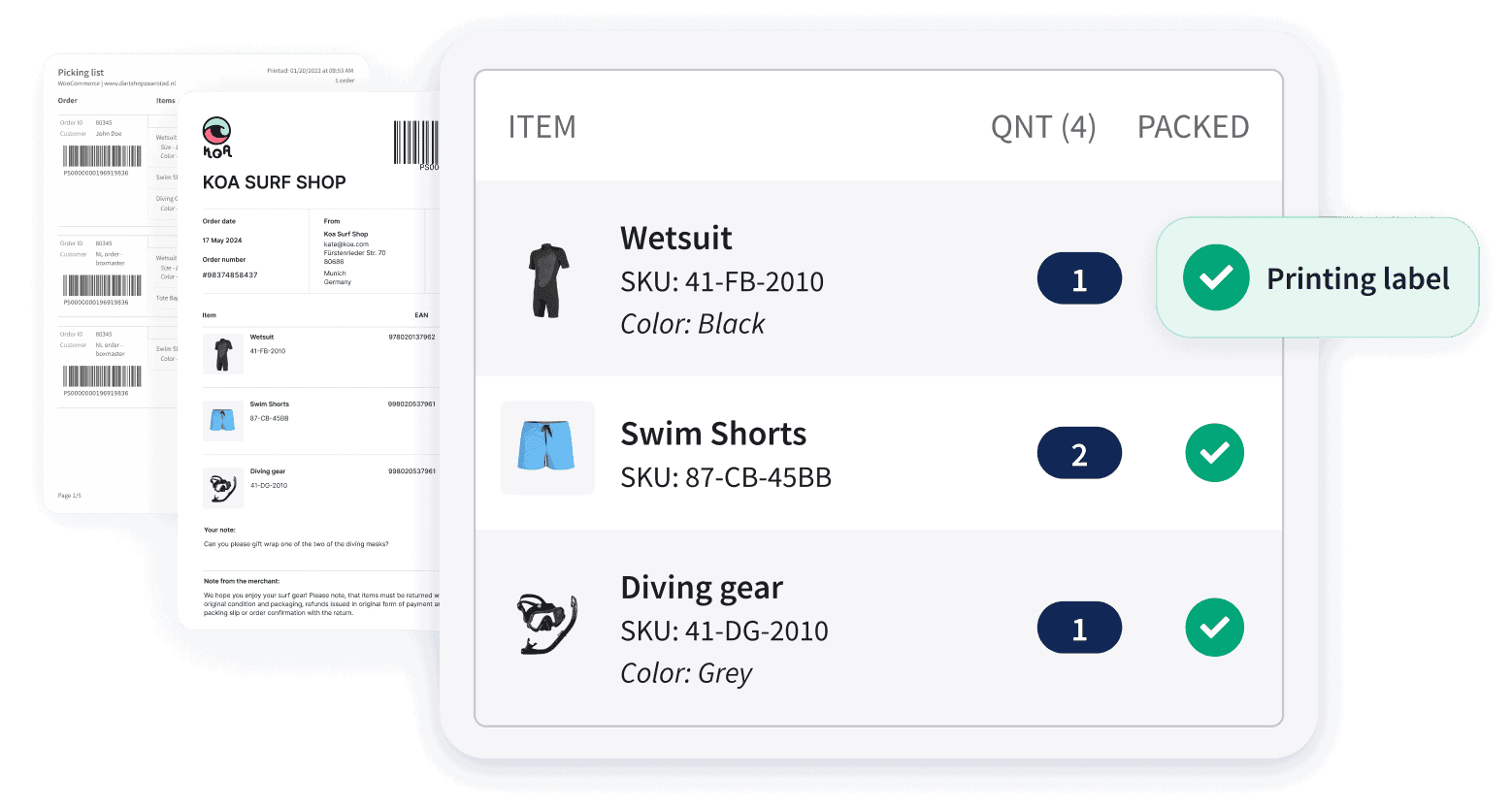
With Sendcloud, you can generate packing slips for individual or multiple orders and print them alongside their corresponding shipping labels.

For growing e-commerce teams, Pack & Go helps bring more structure to the packing process. Depending on your workflow and configuration, you can use order barcodes to load the relevant order, work from picking lists, and verify products with barcode scanning where supported.

Instead of treating packing slips, order information, and shipping labels as separate tasks, you can connect them in one more efficient workflow.

The result? Less manual order handling, more consistent packing checks, and a smoother process as order volumes grow.

Make packing slips part of a smarter fulfillment workflow

A packing slip may be a simple document, but the process around it matters more as your order volumes grow. Structured picking, packing, verification and document generation help you keep fulfillment efficient as you scale.

Ready to streamline your picking and packing process? Discover how Sendcloud helps you process orders faster, reduce manual work and create a more efficient fulfillment workflow.

FAQs

What is a packing slip?

A packing slip is a document that lists the products and quantities included in a shipment. It usually travels inside the parcel and helps your fulfillment team and customer check what’s inside.

Where do you put a packing slip?

Most merchants put the packing slip inside the parcel, so the customer finds it when they open the box. If your workflow needs it visible from the outside, you can use a transparent document pouch on the outside of the parcel instead. Either way, make sure it doesn’t cover the shipping label.

Is a packing slip the same as an invoice?

No. A packing slip lists the physical contents of a shipment, while an invoice records the financial transaction and usually includes prices, taxes, discounts, and payment information.

Does a packing slip include prices?

Usually not. Packing slips generally focus on the products and quantities included in the shipment rather than their prices. For gift orders, merchants often leave prices off on purpose. For dropshipping or blind shipping, they may also leave out supplier or pricing details, depending on the workflow.

Is a packing slip the same as a shipping label?

No. A shipping label is attached to the outside of the parcel and gives the carrier the information needed to deliver it. A packing slip usually goes inside the parcel and lists its contents.

Is a packing slip the same as a picking list?

No. A picking list is an internal warehouse document that tells your team which products to collect for one or more orders. A packing slip describes what belongs in a specific shipment and is used when packing.

Do I need to include a packing slip in every order?

Not necessarily. Packing slips are not required for every e-commerce shipment, but they can help your team check orders, organize split shipments, and give customers a clear overview of what they received.

What’s the difference between a packing slip and a bill of lading?

A bill of lading is a freight document that acts as a contract and receipt between the shipper and the carrier. A packing slip simply lists what’s inside a parcel. For most e-commerce parcel shipments, you’ll work with packing slips and shipping labels rather than bills of lading.

Can I create packing slips with Sendcloud?

Yes. You can generate packing slips for your orders in Sendcloud and use them as part of your picking, packing, and shipping workflow.

Can I print packing slips and shipping labels together?

Yes. With Sendcloud, you can generate packing slips together with their corresponding shipping labels, helping your team keep the right documents connected to the right shipment.

FAQs

What is a packing slip?

A packing slip is a document that lists the products and quantities included in a shipment. It usually travels inside the parcel and helps your fulfillment team and customer check what’s inside.

Where do you put a packing slip?

Most merchants put the packing slip inside the parcel, so the customer finds it when they open the box. If your workflow needs it visible from the outside, you can use a transparent document pouch on the outside of the parcel instead. Either way, make sure it doesn’t cover the shipping label.

Is a packing slip the same as an invoice?

No. A packing slip lists the physical contents of a shipment, while an invoice records the financial transaction and usually includes prices, taxes, discounts, and payment information.

Does a packing slip include prices?

Usually not. Packing slips generally focus on the products and quantities included in the shipment rather than their prices. For gift orders, merchants often leave prices off on purpose. For dropshipping or blind shipping, they may also leave out supplier or pricing details, depending on the workflow.

Is a packing slip the same as a shipping label?

No. A shipping label is attached to the outside of the parcel and gives the carrier the information needed to deliver it. A packing slip usually goes inside the parcel and lists its contents.

Is a packing slip the same as a picking list?

No. A picking list is an internal warehouse document that tells your team which products to collect for one or more orders. A packing slip describes what belongs in a specific shipment and is used when packing.

Do I need to include a packing slip in every order?

Not necessarily. Packing slips are not required for every e-commerce shipment, but they can help your team check orders, organize split shipments, and give customers a clear overview of what they received.

What’s the difference between a packing slip and a bill of lading?

A bill of lading is a freight document that acts as a contract and receipt between the shipper and the carrier. A packing slip simply lists what’s inside a parcel. For most e-commerce parcel shipments, you’ll work with packing slips and shipping labels rather than bills of lading.

Can I create packing slips with Sendcloud?

Yes. You can generate packing slips for your orders in Sendcloud and use them as part of your picking, packing, and shipping workflow.

Can I print packing slips and shipping labels together?

Yes. With Sendcloud, you can generate packing slips together with their corresponding shipping labels, helping your team keep the right documents connected to the right shipment.

FAQs

What is a packing slip?

A packing slip is a document that lists the products and quantities included in a shipment. It usually travels inside the parcel and helps your fulfillment team and customer check what’s inside.

Where do you put a packing slip?

Most merchants put the packing slip inside the parcel, so the customer finds it when they open the box. If your workflow needs it visible from the outside, you can use a transparent document pouch on the outside of the parcel instead. Either way, make sure it doesn’t cover the shipping label.

Is a packing slip the same as an invoice?

No. A packing slip lists the physical contents of a shipment, while an invoice records the financial transaction and usually includes prices, taxes, discounts, and payment information.

Does a packing slip include prices?

Usually not. Packing slips generally focus on the products and quantities included in the shipment rather than their prices. For gift orders, merchants often leave prices off on purpose. For dropshipping or blind shipping, they may also leave out supplier or pricing details, depending on the workflow.

Is a packing slip the same as a shipping label?

No. A shipping label is attached to the outside of the parcel and gives the carrier the information needed to deliver it. A packing slip usually goes inside the parcel and lists its contents.

Is a packing slip the same as a picking list?

No. A picking list is an internal warehouse document that tells your team which products to collect for one or more orders. A packing slip describes what belongs in a specific shipment and is used when packing.

Do I need to include a packing slip in every order?

Not necessarily. Packing slips are not required for every e-commerce shipment, but they can help your team check orders, organize split shipments, and give customers a clear overview of what they received.

What’s the difference between a packing slip and a bill of lading?

A bill of lading is a freight document that acts as a contract and receipt between the shipper and the carrier. A packing slip simply lists what’s inside a parcel. For most e-commerce parcel shipments, you’ll work with packing slips and shipping labels rather than bills of lading.

Can I create packing slips with Sendcloud?

Yes. You can generate packing slips for your orders in Sendcloud and use them as part of your picking, packing, and shipping workflow.

Can I print packing slips and shipping labels together?

Yes. With Sendcloud, you can generate packing slips together with their corresponding shipping labels, helping your team keep the right documents connected to the right shipment.

Author and researcher

Aleyna Ayyildiz is a Content Marketing Intern at Sendcloud, where she creates content around e-commerce, customer experience, and shipping. With a background in International Business and a passion for marketing and communication, she enjoys turning insights into engaging content that helps online retailers connect with their customers and grow their business.

Subject matter expert

Greta Marini is a Product Manager at Sendcloud with a passion for automation and customer-centric product development. She contributes insights on shipping technology, workflow optimization, and the future of logistics innovation.

How much time can you save on shipping?

Save time and money shipping with Sendcloud

More than 2,600 five star reviews

Share

Ready to ship like the big brands?

Automate your shipping from checkout to returns and exceed customer expectations with a 5-star delivery experience.

sendcloud platform

Ready to ship like the big brands?

Automate your shipping from checkout to returns and exceed customer expectations with a 5-star delivery experience.

sendcloud platform

Ready to ship like the big brands?

Automate your shipping from checkout to returns and exceed customer expectations with a 5-star delivery experience.

sendcloud platform