OpenCart shipping integration for SMB online stores

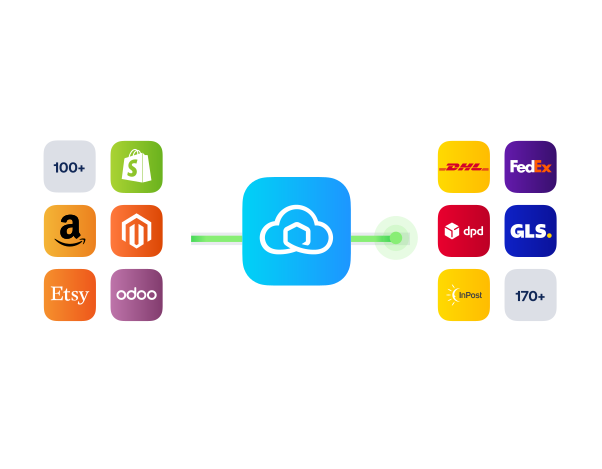
Connect OpenCart with Sendcloud to auto-import orders, print labels in bulk, and ship with 170+ carriers without changing your checkout.

4.6 Shopify App Store

4.6 G2

4.3 Trustpilot

SAP Business One
SAP Business One
SAP Business One
SAP Business One
SAP Business One
SAP Business One
SAP Business One
SAP Business One
SAP Business One
SAP Business One

Why Open Cart merchants choose Sendcloud

Smart shipping with Open Cart

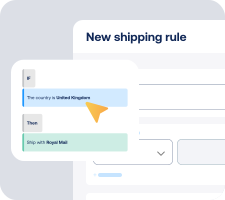
As OpenCart orders grow, manual shipping slows you down. Sendcloud syncs orders, lets you bulk-print labels, and connects 170+ carriers. Automate dispatch, send branded tracking, and handle returns from one place.

Import OpenCart orders to Sendcloud automatically

Create returns using OpenCart order data

Offer service point delivery with 390K+ EU pickup points
SAP Business One

HOW TO CONNECT

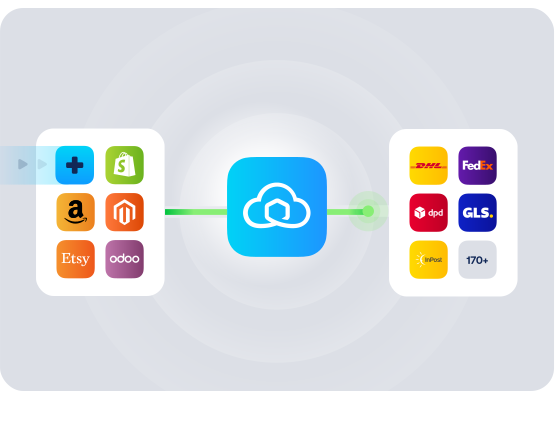
A simple 3-step flow:

Run your shipping operations from one place.
SAP Business One

Connect Open Cart to Sendcloud

SAP Business One

Choose carriers and automate shipping rules

SAP Business One

Manage shipping, tracking, and returns in one place

SAP Business One

Get the most out of Open Cart with Sendcloud

Grow your business

Add 170+ carriers and reach buyers across Europe.

SAP Business One

Ship more efficiently

Bulk-print labels and trigger dispatch from your order list.

SAP Business One

Deliver great experiences

Offer pickup and home delivery with branded tracking.

SAP Business One

Resolve shipping issues faster

Sync delivery statuses to OpenCart to act on issues quickly.

SAP Business One

MULTI-CARRIER STRATEGY

OpenCart shipping with the carriers your customers expect

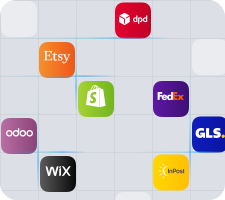
Offer the right delivery every time. With Sendcloud, ship with 170+ carriers using our pre-negotiated rates or your own contracts, then track and manage returns in one place.
Questions & answers

How fast can I connect Open Cart to Sendcloud?

Setup takes minutes. In Open Cart, install the Open Cart connector for Sendcloud and authorize your account, and orders start syncing into Sendcloud. Your OpenCart shipping integration is live as soon as the first label prints.

For step-by-step instructions, see Sendcloud's Open Cart Help Center article.

What does the OpenCart shipping integration include?

Once connected, Sendcloud automates the shipping work and writes results back.

  • Automatic order import to your Sendcloud account

  • Pickup-point delivery options at checkout where supported

  • 170+ carriers managed from one platform

  • Shipping Automation by destination, weight, value, or tags

  • Pack & Go for picking and packing

  • Branded tracking and the return portal at no extra setup

  • OpenCart shipping plugin scales as you add channels or carriers

Will the OpenCart carrier integration work with my checkout and shipping methods?

Yes. Once you enable carriers and shipping methods in Sendcloud, they show in the Open Cart checkout. Pickup-point selection, home delivery, and per-method costs all stay under my control.

  • Checkout-aware: Service points and delivery options where carriers support them.

  • No replatforming: Keep my Open Cart setup unchanged.

The OpenCart delivery integration keeps my checkout consistent across markets.

How much does the OpenCart shipping integration cost, and can I cancel?

Yes, you can cancel anytime. Start on the Sendcloud Free plan and pay per label as you ship. Most Open Cart merchants stay on Free or Lite as they grow; upgrade only when you need more volume or advanced features.

Disconnect your Open Cart Sendcloud connection anytime from Settings > Integrations. No contract, no exit fees. See Sendcloud plans and pricing.

Can I keep my own carrier contracts?

Yes. Use Sendcloud's pre-negotiated rates, upload your own carrier contracts, or mix both. Add or switch carriers anytime across 170+ options. Own-contract setups need a paid Sendcloud plan.

How are international shipments and customs handled?

For non-EU shipments, Sendcloud generates customs documents from your Open Cart order data. HS codes, weights, values, and country of origin flow through automatically, including ICS2 compliance.

How does syncing and tracking work between Open Cart and Sendcloud?

Orders flow from Open Cart to Sendcloud automatically. As you create labels and parcels move through each step, status updates flow back to Open Cart so order states stay in sync. Tracking numbers are added, and customers receive branded tracking messages without extra manual work.

Questions & answers

How fast can I connect Open Cart to Sendcloud?

Setup takes minutes. In Open Cart, install the Open Cart connector for Sendcloud and authorize your account, and orders start syncing into Sendcloud. Your OpenCart shipping integration is live as soon as the first label prints.

For step-by-step instructions, see Sendcloud's Open Cart Help Center article.

What does the OpenCart shipping integration include?

Once connected, Sendcloud automates the shipping work and writes results back.

  • Automatic order import to your Sendcloud account

  • Pickup-point delivery options at checkout where supported

  • 170+ carriers managed from one platform

  • Shipping Automation by destination, weight, value, or tags

  • Pack & Go for picking and packing

  • Branded tracking and the return portal at no extra setup

  • OpenCart shipping plugin scales as you add channels or carriers

Will the OpenCart carrier integration work with my checkout and shipping methods?

Yes. Once you enable carriers and shipping methods in Sendcloud, they show in the Open Cart checkout. Pickup-point selection, home delivery, and per-method costs all stay under my control.

  • Checkout-aware: Service points and delivery options where carriers support them.

  • No replatforming: Keep my Open Cart setup unchanged.

The OpenCart delivery integration keeps my checkout consistent across markets.

How much does the OpenCart shipping integration cost, and can I cancel?

Yes, you can cancel anytime. Start on the Sendcloud Free plan and pay per label as you ship. Most Open Cart merchants stay on Free or Lite as they grow; upgrade only when you need more volume or advanced features.

Disconnect your Open Cart Sendcloud connection anytime from Settings > Integrations. No contract, no exit fees. See Sendcloud plans and pricing.

Can I keep my own carrier contracts?

Yes. Use Sendcloud's pre-negotiated rates, upload your own carrier contracts, or mix both. Add or switch carriers anytime across 170+ options. Own-contract setups need a paid Sendcloud plan.

How are international shipments and customs handled?

For non-EU shipments, Sendcloud generates customs documents from your Open Cart order data. HS codes, weights, values, and country of origin flow through automatically, including ICS2 compliance.

How does syncing and tracking work between Open Cart and Sendcloud?

Orders flow from Open Cart to Sendcloud automatically. As you create labels and parcels move through each step, status updates flow back to Open Cart so order states stay in sync. Tracking numbers are added, and customers receive branded tracking messages without extra manual work.

Questions & answers

How fast can I connect Open Cart to Sendcloud?

Setup takes minutes. In Open Cart, install the Open Cart connector for Sendcloud and authorize your account, and orders start syncing into Sendcloud. Your OpenCart shipping integration is live as soon as the first label prints.

For step-by-step instructions, see Sendcloud's Open Cart Help Center article.

What does the OpenCart shipping integration include?

Once connected, Sendcloud automates the shipping work and writes results back.

  • Automatic order import to your Sendcloud account

  • Pickup-point delivery options at checkout where supported

  • 170+ carriers managed from one platform

  • Shipping Automation by destination, weight, value, or tags

  • Pack & Go for picking and packing

  • Branded tracking and the return portal at no extra setup

  • OpenCart shipping plugin scales as you add channels or carriers

Will the OpenCart carrier integration work with my checkout and shipping methods?

Yes. Once you enable carriers and shipping methods in Sendcloud, they show in the Open Cart checkout. Pickup-point selection, home delivery, and per-method costs all stay under my control.

  • Checkout-aware: Service points and delivery options where carriers support them.

  • No replatforming: Keep my Open Cart setup unchanged.

The OpenCart delivery integration keeps my checkout consistent across markets.

How much does the OpenCart shipping integration cost, and can I cancel?

Yes, you can cancel anytime. Start on the Sendcloud Free plan and pay per label as you ship. Most Open Cart merchants stay on Free or Lite as they grow; upgrade only when you need more volume or advanced features.

Disconnect your Open Cart Sendcloud connection anytime from Settings > Integrations. No contract, no exit fees. See Sendcloud plans and pricing.

Can I keep my own carrier contracts?

Yes. Use Sendcloud's pre-negotiated rates, upload your own carrier contracts, or mix both. Add or switch carriers anytime across 170+ options. Own-contract setups need a paid Sendcloud plan.

How are international shipments and customs handled?

For non-EU shipments, Sendcloud generates customs documents from your Open Cart order data. HS codes, weights, values, and country of origin flow through automatically, including ICS2 compliance.

How does syncing and tracking work between Open Cart and Sendcloud?

Orders flow from Open Cart to Sendcloud automatically. As you create labels and parcels move through each step, status updates flow back to Open Cart so order states stay in sync. Tracking numbers are added, and customers receive branded tracking messages without extra manual work.

Connect OpenCart and ship with 170+ carriers today

170+ carriers available

Discounted shipping rates

Cancel anytime
Start for free

FInd out more