


Online stores were already hugely popular, but during the pandemic they seem to be popping up everywhere.
These (new) online stores vary widely in design, the platform they run on, and certainly in performance.
Performance, and especially the speed of your online store, is really important these days. There's no getting around it!
People expect ever-faster loading web pages, and if a page doesn't load within a few seconds, visitors drop off and click through to the next result: in the worst case, your direct competitor.
Amazon declared some time ago that if their online store loaded one second slower, it would cost them a staggering $1.6 billion a year.
For Google, it's one of the most important official ranking factors. So there are plenty of reasons to take a critical look at the speed of your online store.
In this article, you'll learn how to test the speed of your online store, and you'll get 5 tips to speed it up for more conversions!
Want to test and improve your online store's speed?
In the spirit of speed, let's get straight into it. Learn how to measure the speed of your online store and follow the 5 tips to improve it:
First things first: testing your website speed
You can measure your website's current speed in several ways. The best known is this tool from Google: Google PageSpeed Insights.
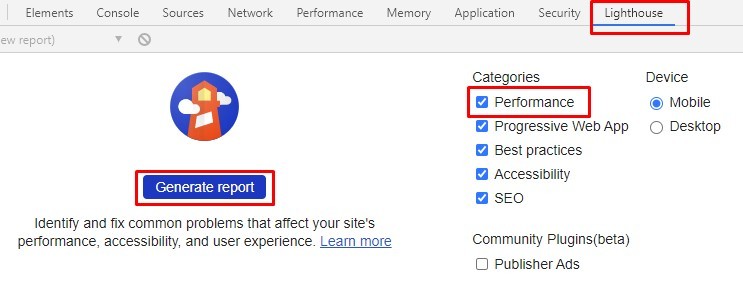
You can also generate a Lighthouse report directly in your Chrome browser via developer tools (F12).
Another popular option is GTmetrix. It gives you insight into your website's speed and scores you on a number of elements that play an important role in performance.
5 tips to speed up your online store for more conversions
Were you shocked or pleasantly surprised by your online store's speed? We hope it's the latter, of course.
If it isn't, we're happy to share 5 tips to help you speed up your online store!
Tip 1: use caching
Caching is a widely used method for making websites and online stores run faster.
So the question isn't whether you should use caching, but which caching method you're going to use.
For WooCommerce, for example, there are countless caching plugins you can install. The most installed ones are:
W3 Total Cache
LiteSpeed Cache
WP Fastest Cache
WP-Optimize
WP Super Cache
The best choice depends on your theme's compatibility, how it works with other plugins, and your own technical know-how.
Other e-commerce software has its own good solutions. Magento 2, for example, comes with built-in support for Full Page Caching or Varnish Caching, and Shopware also has a built-in caching module.
Tip 2: take a critical look at your web hosting
Perhaps one of the most underrated factors for improving an online store's speed is web hosting.
Many companies see it as a necessary evil, prefer to spend as little money on it as possible, and end up with a relatively cheap web host.
In principle, that doesn't have to be a problem if your traffic is stable and you're not on a shared hosting environment, for example.
Especially during busy days around the holidays, during special pre-announced promotions, or on Black Friday, online stores face enormous peak loads.
Other things handled through your hosting, such as memory, hard drive, or the number of CPUs, can also have a big impact on your online store's speed.
Fast web hosting gives things like Time To First Byte (TTFB), Time To Interactive (TTI), and the stability of your online store a huge boost.*
* TTFB and TTI are metrics that calculate how quickly certain elements on your website load.
Tip 3: minimize the number of HTTP requests
Whether your online store runs on WooCommerce, Magento, Shopify, or Shopware: many plugins and themes load all kinds of files from other websites.
These files often contain scripts, stylesheets, and images from external sources such as Google, Facebook, and other services for analytics purposes.
You can't get rid of all of them, and many of these files are optimized to load as quickly as possible, but if these plugins make a lot of requests, it can slow down your online store.
You can reduce all these external HTTP requests by disabling scripts and styles or by combining them into a single file.
You'll be amazed at the speed gains this delivers!

Tip 4: optimize your images
A common mistake is uploading images without optimizing them first.
Every oversized image that has to load has a huge impact on your online store's speed and on your PageSpeed scores in various tools.
There are a few things you can optimize when it comes to images:
Don't upload larger images than you need
If an image doesn't need to be displayed larger than, say, 400 x 400, then you don't need an 800 x 800 image. So upload it at 400 x 400 and no larger.
Compress your images (before uploading them or via the CMS)
These days there are plenty of solutions to help you compress your images.
Think of websites like Imagecompressor.com or Squoosh.com, where you can compress an image and then upload it to your CMS.
There are also plenty of plugins or other cloud services on the market that automate this whole process for you.
Sometimes you pay a few bucks for it, but the time it saves you and the speed gains it delivers are absolutely worth it.
Set up lazy loading
With lazy loading, you make sure images only load once they actually come into view.
So a browser doesn't have to load the entire page all at once; instead, it prioritizes loading the visible images.
For just about every CMS, there's a plugin that enables lazy loading for you. Many speed optimization plugins now include this by default.
If you'd rather not use an extra plugin for lazy loading, you can ask your web developer to implement it.
Tip 5: avoid redirect chains
This is something that comes up regularly, especially with larger online stores. People have worked with 301 redirects for years, and it goes fine.
Until you get redirects that redirect to another redirect and you end up in what's known as a redirect chain...
Such a chain can even cause you to end up in a loop where your browser can no longer find the path.
Not only is this bad for your online store's performance, it's also bad for your SEO because it affects your link equity!
The end result of a redirect chain is similar to a slow TTFB: a blank screen where it takes seconds for the page to load.

Conclusion: speeding up your online store pays off
There are dozens, if not hundreds, of measures you can take to optimize your online store's speed.
The tips above will make a big immediate impact if you don't have this in order yet.
But it doesn't stop there: keep measuring your speed at all times. That way you know where you stand now and where the improvements are!
Optimizing your online store's speed is good for the user experience, for conversion, and for your SEO. In other words: speeding up your online store pays off.
One caveat: optimized scores in the tools shouldn't become a goal in themselves. You test and optimize not for the tools, but for the visitor to your online store.
How does your online store's speed measure up?
About the author
Remon is a freelance SEO specialist at www.hipex.io and specializes in the online findability of websites. Hipex specializes in e-commerce hosting such as Magento and Shopware, and was voted best-rated web host by Emerce in both 2019 and 2020.

Author and researcher
How much time can you save on shipping?

Share
Recommended for you

Shipping Intelligence
Shipping
E-commerce
Best 9 Shipping Data Analytics Software Tools (2026)

VAT on shipping costs: how does it work?
Why do you pay VAT on shipping costs? Which VAT rate should you use, and how do you pass it on smartly to your customer? Find the answers in this guide.

5 tips to speed up your online store for more conversions
Speeding up your online store is essential for more conversions. Read 5 tips here that help you improve your site speed!