Return Prime and Sendcloud: smoother returns for Shopify stores

Pair Return Prime's returns workflow with Sendcloud to print return labels across 170+ carriers and brand the entire post-purchase experience.

4.6 Shopify App Store

4.6 G2

4.3 Trustpilot

Return Prime
Return Prime
Return Prime
Return Prime
Return Prime
Return Prime
Return Prime
Return Prime
Return Prime
Return Prime

Why Shopify merchants pair Return Prime with Sendcloud

Smart returns with Return Prime and Sendcloud

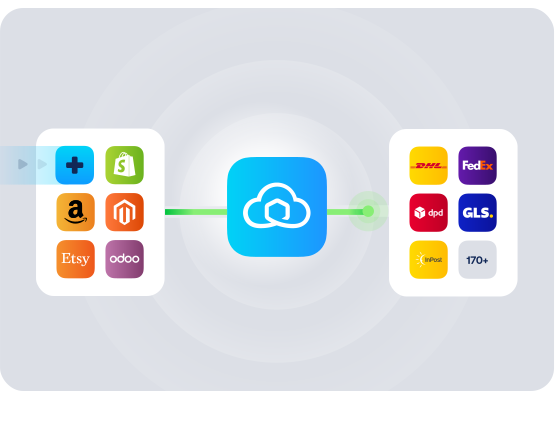
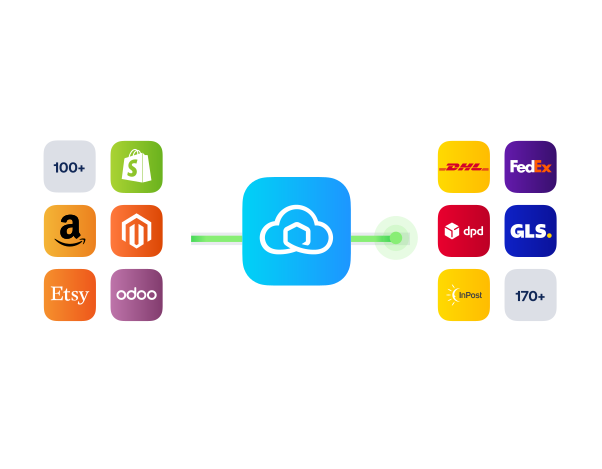
Return Prime runs the customer-facing returns flow on Shopify; Sendcloud generates the labels and handles tracking across 170+ carriers. Together they replace the patchwork of email, spreadsheets, and manual labels with a single workflow your team and your buyers can both rely on.

Automate the customer-facing returns flow with Return Prime

Brand tracking and the return portal end-to-end

Print return labels with 170+ carriers via Sendcloud
Return Prime

HOW TO CONNECT

A simple 3-step flow:

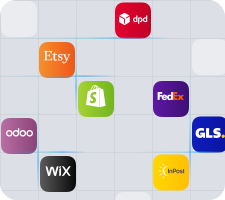
Run your shipping operations from one place.
Return Prime

Connect Return Prime to your Shopify store
Return Prime

Connect Sendcloud to the same store

Return Prime

Returns and outbound flow through the same shipping layer

Return Prime

Get the most out of Return Prime with Sendcloud

Automate returns

Return Prime handles the customer-facing flow; Sendcloud handles the label.

Return Prime

Brand the journey

Tracking emails and the return portal carry your brand through every step.

Return Prime

Speed up refunds and exchanges

One returns workflow means refunds and exchanges move faster.

Return Prime

See the full picture

Returns data sits next to outbound shipping data for cleaner reporting.

Return Prime

MULTI-CARRIER STRATEGY

Return Prime returns with the carriers your customers expect

Shopify buyers expect a clean returns experience and a real label, not a wait-for-email queue. Sendcloud's 170+ carriers cover both inbound returns and outbound shipping from one platform.
Questions & answers

How does Return Prime work with Sendcloud?

Return Prime runs in your Shopify store as the customer-facing returns flow. Sendcloud connects to the same store and generates return labels across 170+ carriers. The two work together so customers get a clean returns experience and you get one label workflow.

See Return Prime for returns automation and Sendcloud's Help Center for label setup.

What does the Return Prime shipping integration include?

Once connected, Sendcloud automates the shipping work and writes results back to Return Prime.

  • Order import from Return Prime

  • Multi-carrier rate selection across 170+ carriers

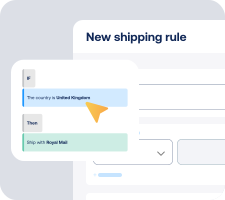
  • Shipping rules by destination, weight, value, or tags

  • Label creation for single or batch flows

  • Tracking write-back to Return Prime orders

  • Return Prime carrier integration scales as you add or switch carriers

Will Return Prime and Sendcloud fit my existing Shopify setup?

Yes. Return Prime installs from the Shopify App Store; Sendcloud connects to the same store and handles labels, tracking, and outbound shipping. Both work alongside your current theme without dev work.

  • No replatform: Keep your Shopify store unchanged.

  • Returns + outbound: One workflow for both directions.

How much does the Return Prime shipping integration cost, and can I cancel?

Yes, you can cancel anytime. Start on the Sendcloud Free plan and pay per label as you ship. Most Return Prime merchants stay on Free or Lite as they grow; upgrade only when you need more volume or advanced features.

Disconnect your Return Prime Sendcloud connection anytime from Settings > Integrations. No contract, no exit fees. See Sendcloud plans and pricing.

Can we keep our own carrier contracts?

Yes. Use Sendcloud's pre-negotiated rates, upload your own carrier contracts, or mix both. Add or switch carriers anytime across 170+ options. Own-contract setups need a paid Sendcloud plan.

Where do Return Prime and Sendcloud work?

Return Prime is used by Shopify merchants globally; Sendcloud ships across 170+ carriers. For non-EU return parcels, Sendcloud generates customs documents from order data automatically.

How do data and orders sync across Return Prime and Sendcloud?

Return Prime drives the returns workflow on the buyer side. Sendcloud picks up the return parcel, generates the label, and writes tracking back. Both run alongside your Shopify store without owning your inventory or financial data.

Questions & answers

How does Return Prime work with Sendcloud?

Return Prime runs in your Shopify store as the customer-facing returns flow. Sendcloud connects to the same store and generates return labels across 170+ carriers. The two work together so customers get a clean returns experience and you get one label workflow.

See Return Prime for returns automation and Sendcloud's Help Center for label setup.

What does the Return Prime shipping integration include?

Once connected, Sendcloud automates the shipping work and writes results back to Return Prime.

  • Order import from Return Prime

  • Multi-carrier rate selection across 170+ carriers

  • Shipping rules by destination, weight, value, or tags

  • Label creation for single or batch flows

  • Tracking write-back to Return Prime orders

  • Return Prime carrier integration scales as you add or switch carriers

Will Return Prime and Sendcloud fit my existing Shopify setup?

Yes. Return Prime installs from the Shopify App Store; Sendcloud connects to the same store and handles labels, tracking, and outbound shipping. Both work alongside your current theme without dev work.

  • No replatform: Keep your Shopify store unchanged.

  • Returns + outbound: One workflow for both directions.

How much does the Return Prime shipping integration cost, and can I cancel?

Yes, you can cancel anytime. Start on the Sendcloud Free plan and pay per label as you ship. Most Return Prime merchants stay on Free or Lite as they grow; upgrade only when you need more volume or advanced features.

Disconnect your Return Prime Sendcloud connection anytime from Settings > Integrations. No contract, no exit fees. See Sendcloud plans and pricing.

Can we keep our own carrier contracts?

Yes. Use Sendcloud's pre-negotiated rates, upload your own carrier contracts, or mix both. Add or switch carriers anytime across 170+ options. Own-contract setups need a paid Sendcloud plan.

Where do Return Prime and Sendcloud work?

Return Prime is used by Shopify merchants globally; Sendcloud ships across 170+ carriers. For non-EU return parcels, Sendcloud generates customs documents from order data automatically.

How do data and orders sync across Return Prime and Sendcloud?

Return Prime drives the returns workflow on the buyer side. Sendcloud picks up the return parcel, generates the label, and writes tracking back. Both run alongside your Shopify store without owning your inventory or financial data.

Questions & answers

How does Return Prime work with Sendcloud?

Return Prime runs in your Shopify store as the customer-facing returns flow. Sendcloud connects to the same store and generates return labels across 170+ carriers. The two work together so customers get a clean returns experience and you get one label workflow.

See Return Prime for returns automation and Sendcloud's Help Center for label setup.

What does the Return Prime shipping integration include?

Once connected, Sendcloud automates the shipping work and writes results back to Return Prime.

  • Order import from Return Prime

  • Multi-carrier rate selection across 170+ carriers

  • Shipping rules by destination, weight, value, or tags

  • Label creation for single or batch flows

  • Tracking write-back to Return Prime orders

  • Return Prime carrier integration scales as you add or switch carriers

Will Return Prime and Sendcloud fit my existing Shopify setup?

Yes. Return Prime installs from the Shopify App Store; Sendcloud connects to the same store and handles labels, tracking, and outbound shipping. Both work alongside your current theme without dev work.

  • No replatform: Keep your Shopify store unchanged.

  • Returns + outbound: One workflow for both directions.

How much does the Return Prime shipping integration cost, and can I cancel?

Yes, you can cancel anytime. Start on the Sendcloud Free plan and pay per label as you ship. Most Return Prime merchants stay on Free or Lite as they grow; upgrade only when you need more volume or advanced features.

Disconnect your Return Prime Sendcloud connection anytime from Settings > Integrations. No contract, no exit fees. See Sendcloud plans and pricing.

Can we keep our own carrier contracts?

Yes. Use Sendcloud's pre-negotiated rates, upload your own carrier contracts, or mix both. Add or switch carriers anytime across 170+ options. Own-contract setups need a paid Sendcloud plan.

Where do Return Prime and Sendcloud work?

Return Prime is used by Shopify merchants globally; Sendcloud ships across 170+ carriers. For non-EU return parcels, Sendcloud generates customs documents from order data automatically.

How do data and orders sync across Return Prime and Sendcloud?

Return Prime drives the returns workflow on the buyer side. Sendcloud picks up the return parcel, generates the label, and writes tracking back. Both run alongside your Shopify store without owning your inventory or financial data.

Pair Return Prime and Sendcloud for cleaner returns

170+ carriers available

Discounted shipping rates

Cancel anytime
Start for free

FInd out more