RetailVista

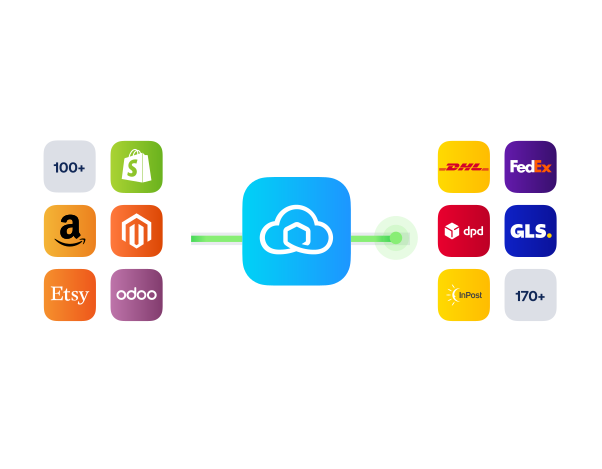
Connect RetailVista with Sendcloud to ship store and ecommerce orders from one flow, choose from 170+ carriers, and write tracking back to RetailVista.

4.6 Shopify App Store

4.6 G2

4.3 Trustpilot

RetailVista
RetailVista
RetailVista
RetailVista
RetailVista
RetailVista
RetailVista
RetailVista
RetailVista
RetailVista

Why RetailVista retailers choose Sendcloud

Smart shipping with RetailVista

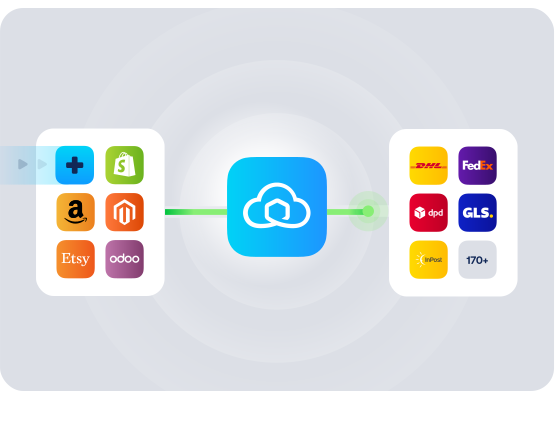
RetailVista runs your store and ecommerce operations end to end; Sendcloud handles the shipping. Connect them to ship online orders and store-fulfilled parcels from one place, pick rates across 170+ carriers, and write tracking back to RetailVista so customer service sees the same status in real time.

Ship online and store-fulfilled orders from one flow

Sync tracking back to RetailVista orders

Compare rates across 170+ carriers
RetailVista

HOW TO CONNECT

A simple 3-step flow:

Run your shipping operations from one place.
RetailVista

Connect RetailVista to Sendcloud

RetailVista

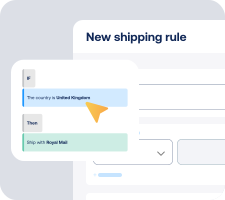
Choose carriers and automate shipping rules
RetailVista

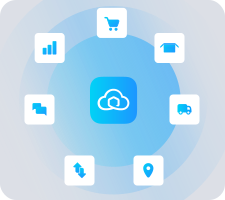
Manage shipping, tracking, and returns in one place

RetailVista

Get the most out of RetailVista with Sendcloud

Run omnichannel shipping

Online, click & collect, and store-to-door all flow through the same RetailVista workflow.

RetailVista

Ship efficiently

Batch-print labels and apply rules to skip manual carrier selection per order.

RetailVista

Improve service

Tracking writes back to RetailVista, so store and support staff see the same status.

RetailVista

Adapt to peak

Add carriers and capacity for peaks without changing your RetailVista setup.

RetailVista

MULTI-CARRIER STRATEGY

RetailVista shipping with the carriers your operations need

Run a flexible carrier mix across PostNL, DPD, DHL, and 170+ more. Use Sendcloud's pre-negotiated rates or upload your own contracts, and switch services per region or product without changing RetailVista.

Questions & answers

How do we connect RetailVista to Sendcloud?

RetailVista connects to Sendcloud via API or a certified middleware partner. Sales orders flow from RetailVista into Sendcloud, you pick a carrier, print labels, and tracking writes back to the order. Your RetailVista shipping integration is live as soon as the first label prints.

See NedFox/RetailVista and Sendcloud's Help Center for setup details.

What does the RetailVista shipping integration include?

Once connected, Sendcloud automates the shipping work and writes results back to RetailVista.

  • Order import from RetailVista

  • Multi-carrier rate selection across 170+ carriers

  • Shipping rules by destination, weight, value, or tags

  • Label creation for single or batch flows

  • Tracking write-back to RetailVista orders

  • RetailVista carrier integration scales as you add or switch carriers

Will the RetailVista ERP integration fit our existing fulfillment workflow?

Yes. Sales orders, inventory, accounting, and POS data stay in RetailVista. Sendcloud sits on top for carrier selection, label printing, and tracking.

  • Field mapping: Use the order data you already have, including SKUs, weights, and addresses.

  • Multi-location: Apply shipping rules per store or warehouse and batch print by pick wave.

  • Flexible printing: Print to thermal or PDF from your packing stations.

How much does the RetailVista shipping integration cost, and can we cancel?

Most ERP and warehouse teams start on a paid Sendcloud plan (Lite, Growth, or Premium) since you'll typically ship on your own carrier contracts, which require a paid plan, and run higher monthly volumes. The Free plan is enough to validate the connection, but production setups outgrow it quickly.

Disconnect your RetailVista Sendcloud connection anytime from Settings > Integrations. No contract, no exit fees. See Sendcloud plans and pricing.

Can we keep our own carrier contracts?

Yes. Use Sendcloud's pre-negotiated rates, upload your own carrier contracts, or mix both. Add or switch carriers anytime across 170+ options. Own-contract setups need a paid Sendcloud plan.

How are international shipments and customs handled?

For non-EU shipments, Sendcloud generates customs documents from your RetailVista order data. HS codes, weights, values, and country of origin flow through automatically, including ICS2 compliance.

What stays in RetailVista, and what goes to Sendcloud?

RetailVista stays your source of truth for inventory, accounting, store operations, and order management. Sendcloud handles outbound shipping only: carrier selection, label printing, tracking. Sendcloud doesn't touch inventory or financial records; it pulls order data and writes back tracking.

Questions & answers

How do we connect RetailVista to Sendcloud?

RetailVista connects to Sendcloud via API or a certified middleware partner. Sales orders flow from RetailVista into Sendcloud, you pick a carrier, print labels, and tracking writes back to the order. Your RetailVista shipping integration is live as soon as the first label prints.

See NedFox/RetailVista and Sendcloud's Help Center for setup details.

What does the RetailVista shipping integration include?

Once connected, Sendcloud automates the shipping work and writes results back to RetailVista.

  • Order import from RetailVista

  • Multi-carrier rate selection across 170+ carriers

  • Shipping rules by destination, weight, value, or tags

  • Label creation for single or batch flows

  • Tracking write-back to RetailVista orders

  • RetailVista carrier integration scales as you add or switch carriers

Will the RetailVista ERP integration fit our existing fulfillment workflow?

Yes. Sales orders, inventory, accounting, and POS data stay in RetailVista. Sendcloud sits on top for carrier selection, label printing, and tracking.

  • Field mapping: Use the order data you already have, including SKUs, weights, and addresses.

  • Multi-location: Apply shipping rules per store or warehouse and batch print by pick wave.

  • Flexible printing: Print to thermal or PDF from your packing stations.

How much does the RetailVista shipping integration cost, and can we cancel?

Most ERP and warehouse teams start on a paid Sendcloud plan (Lite, Growth, or Premium) since you'll typically ship on your own carrier contracts, which require a paid plan, and run higher monthly volumes. The Free plan is enough to validate the connection, but production setups outgrow it quickly.

Disconnect your RetailVista Sendcloud connection anytime from Settings > Integrations. No contract, no exit fees. See Sendcloud plans and pricing.

Can we keep our own carrier contracts?

Yes. Use Sendcloud's pre-negotiated rates, upload your own carrier contracts, or mix both. Add or switch carriers anytime across 170+ options. Own-contract setups need a paid Sendcloud plan.

How are international shipments and customs handled?

For non-EU shipments, Sendcloud generates customs documents from your RetailVista order data. HS codes, weights, values, and country of origin flow through automatically, including ICS2 compliance.

What stays in RetailVista, and what goes to Sendcloud?

RetailVista stays your source of truth for inventory, accounting, store operations, and order management. Sendcloud handles outbound shipping only: carrier selection, label printing, tracking. Sendcloud doesn't touch inventory or financial records; it pulls order data and writes back tracking.

Questions & answers

How do we connect RetailVista to Sendcloud?

RetailVista connects to Sendcloud via API or a certified middleware partner. Sales orders flow from RetailVista into Sendcloud, you pick a carrier, print labels, and tracking writes back to the order. Your RetailVista shipping integration is live as soon as the first label prints.

See NedFox/RetailVista and Sendcloud's Help Center for setup details.

What does the RetailVista shipping integration include?

Once connected, Sendcloud automates the shipping work and writes results back to RetailVista.

  • Order import from RetailVista

  • Multi-carrier rate selection across 170+ carriers

  • Shipping rules by destination, weight, value, or tags

  • Label creation for single or batch flows

  • Tracking write-back to RetailVista orders

  • RetailVista carrier integration scales as you add or switch carriers

Will the RetailVista ERP integration fit our existing fulfillment workflow?

Yes. Sales orders, inventory, accounting, and POS data stay in RetailVista. Sendcloud sits on top for carrier selection, label printing, and tracking.

  • Field mapping: Use the order data you already have, including SKUs, weights, and addresses.

  • Multi-location: Apply shipping rules per store or warehouse and batch print by pick wave.

  • Flexible printing: Print to thermal or PDF from your packing stations.

How much does the RetailVista shipping integration cost, and can we cancel?

Most ERP and warehouse teams start on a paid Sendcloud plan (Lite, Growth, or Premium) since you'll typically ship on your own carrier contracts, which require a paid plan, and run higher monthly volumes. The Free plan is enough to validate the connection, but production setups outgrow it quickly.

Disconnect your RetailVista Sendcloud connection anytime from Settings > Integrations. No contract, no exit fees. See Sendcloud plans and pricing.

Can we keep our own carrier contracts?

Yes. Use Sendcloud's pre-negotiated rates, upload your own carrier contracts, or mix both. Add or switch carriers anytime across 170+ options. Own-contract setups need a paid Sendcloud plan.

How are international shipments and customs handled?

For non-EU shipments, Sendcloud generates customs documents from your RetailVista order data. HS codes, weights, values, and country of origin flow through automatically, including ICS2 compliance.

What stays in RetailVista, and what goes to Sendcloud?

RetailVista stays your source of truth for inventory, accounting, store operations, and order management. Sendcloud handles outbound shipping only: carrier selection, label printing, tracking. Sendcloud doesn't touch inventory or financial records; it pulls order data and writes back tracking.

Set up the RetailVista shipping integration in one session

170+ carriers available

Discounted shipping rates

Cancel anytime
Start for free

FInd out more