KMO Shops

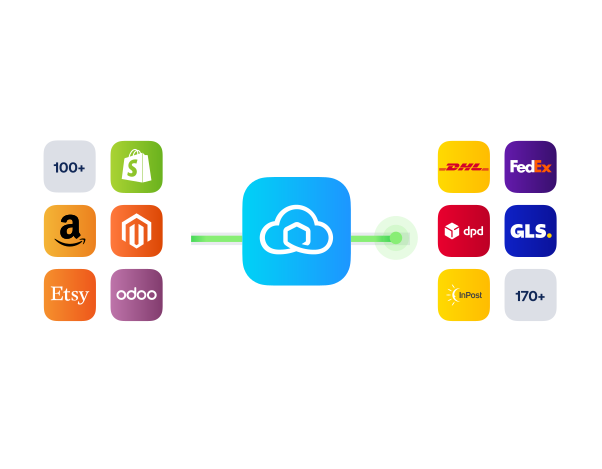
Connect KMO-Shops with Sendcloud to print labels with bpost, DPD, PostNL, and 170+ carriers, and offer service-point delivery at checkout.

4.6 Shopify App Store

4.6 G2

4.3 Trustpilot

KMO-Shops
KMO-Shops
KMO-Shops
KMO-Shops
KMO-Shops
KMO-Shops
KMO-Shops
KMO-Shops
KMO-Shops
KMO-Shops

Why KMO-Shops merchants choose Sendcloud

Smart shipping with KMO-Shops

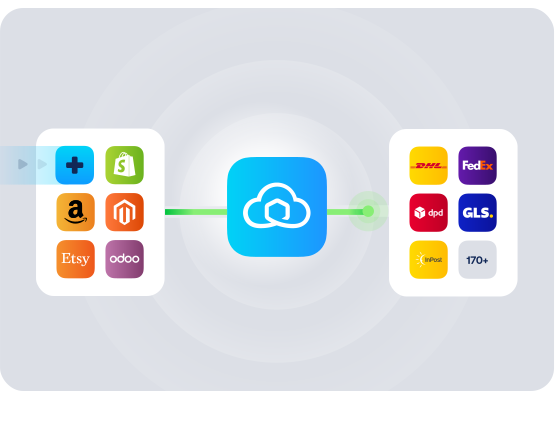
KMO-Shops gives Belgian and Dutch SMBs an easy webshop; Sendcloud handles what comes after the order. Connect them to auto-import orders, print labels for bpost, DPD, PostNL, and more from one tab, and offer service-point delivery at checkout, all without dev work.

Auto-import orders from KMO-Shops

Offer service-point delivery at checkout

Ship with bpost, DPD, PostNL, and 170+ carriers
KMO-Shops

HOW TO CONNECT

A simple 3-step flow:

Run your shipping operations from one place.
KMO-Shops

Connect KMO-Shops to Sendcloud

KMO-Shops

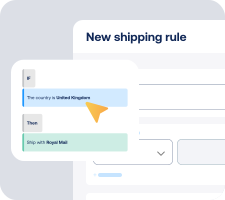
Choose carriers and shipping rules

KMO-Shops

Print labels and send tracking emails automatically
KMO-Shops

Get the most out of KMO-Shops with Sendcloud

Grow across Benelux

Ship to BE and NL with the carriers each market expects, from one workflow.

KMO-Shops

Ship faster

Print labels in batch and skip manual data entry between KMO-Shops and your shipping tool.

KMO-Shops

Win at checkout

Offer bpost and PostNL service points in your KMO-Shops checkout to lift conversion.

KMO-Shops

Cut support tickets

Branded tracking and order updates keep buyers informed without WISMO emails.

KMO-Shops

MULTI-CARRIER STRATEGY

KMO-Shops shipping with the carriers your customers expect

Belgian and Dutch buyers expect bpost, PostNL, DPD, and parcel-shop choice at checkout. Sendcloud's 170+ carriers cover all of it, with your own contracts on top when you grow into new markets.

Questions & answers

How fast can I connect KMO-Shops to Sendcloud?

Setup takes minutes. Install the Sendcloud connector in your KMO-Shops admin, authorize your Sendcloud account, and orders start syncing automatically. Your KMO-Shops shipping integration is live as soon as the first label prints.

See Sendcloud's Help Center for step-by-step setup.

What does the KMO-Shops shipping integration include?

Once connected, Sendcloud automates the shipping work and writes results back to KMO-Shops.

  • Order import from KMO-Shops

  • Multi-carrier rate selection across 170+ carriers

  • Shipping rules by destination, weight, value, or tags

  • Label creation for single or batch flows

  • Tracking write-back to KMO-Shops orders

  • KMO-Shops carrier integration scales as you add or switch carriers

Will the KMO-Shops carrier integration work with my checkout and shipping methods?

Yes. Once you enable carriers and methods in Sendcloud, they show in your KMO-Shops checkout. bpost and PostNL service points, home delivery, and per-method costs stay under your control.

  • Checkout-aware: Service-point selection where carriers support it.

  • No replatform: Keep your KMO-Shops theme and products unchanged.

How much does the KMO-Shops shipping integration cost, and can I cancel?

Yes, you can cancel anytime. Start on the Sendcloud Free plan and pay per label as you ship. Most KMO-Shops merchants stay on Free or Lite as they grow; upgrade only when you need more volume or advanced features.

Disconnect your KMO-Shops Sendcloud connection anytime from Settings > Integrations. No contract, no exit fees. See Sendcloud plans and pricing.

Can we keep our own carrier contracts?

Yes. Use Sendcloud's pre-negotiated rates, upload your own carrier contracts, or mix both. Add or switch carriers anytime across 170+ options. Own-contract setups need a paid Sendcloud plan.

Where does the KMO-Shops integration work?

KMO-Shops is widely used in Belgium and the Netherlands; most merchants ship domestically and across Benelux. For non-EU parcels, Sendcloud generates customs documents from your KMO-Shops order data automatically, including HS codes and ICS2 compliance.

How does syncing and tracking work between KMO-Shops and Sendcloud?

Orders flow from KMO-Shops to Sendcloud automatically. As you create labels, status updates flow back so order states stay in sync. Tracking numbers are added to KMO-Shops orders, and customers receive branded tracking messages without extra manual work.

Questions & answers

How fast can I connect KMO-Shops to Sendcloud?

Setup takes minutes. Install the Sendcloud connector in your KMO-Shops admin, authorize your Sendcloud account, and orders start syncing automatically. Your KMO-Shops shipping integration is live as soon as the first label prints.

See Sendcloud's Help Center for step-by-step setup.

What does the KMO-Shops shipping integration include?

Once connected, Sendcloud automates the shipping work and writes results back to KMO-Shops.

  • Order import from KMO-Shops

  • Multi-carrier rate selection across 170+ carriers

  • Shipping rules by destination, weight, value, or tags

  • Label creation for single or batch flows

  • Tracking write-back to KMO-Shops orders

  • KMO-Shops carrier integration scales as you add or switch carriers

Will the KMO-Shops carrier integration work with my checkout and shipping methods?

Yes. Once you enable carriers and methods in Sendcloud, they show in your KMO-Shops checkout. bpost and PostNL service points, home delivery, and per-method costs stay under your control.

  • Checkout-aware: Service-point selection where carriers support it.

  • No replatform: Keep your KMO-Shops theme and products unchanged.

How much does the KMO-Shops shipping integration cost, and can I cancel?

Yes, you can cancel anytime. Start on the Sendcloud Free plan and pay per label as you ship. Most KMO-Shops merchants stay on Free or Lite as they grow; upgrade only when you need more volume or advanced features.

Disconnect your KMO-Shops Sendcloud connection anytime from Settings > Integrations. No contract, no exit fees. See Sendcloud plans and pricing.

Can we keep our own carrier contracts?

Yes. Use Sendcloud's pre-negotiated rates, upload your own carrier contracts, or mix both. Add or switch carriers anytime across 170+ options. Own-contract setups need a paid Sendcloud plan.

Where does the KMO-Shops integration work?

KMO-Shops is widely used in Belgium and the Netherlands; most merchants ship domestically and across Benelux. For non-EU parcels, Sendcloud generates customs documents from your KMO-Shops order data automatically, including HS codes and ICS2 compliance.

How does syncing and tracking work between KMO-Shops and Sendcloud?

Orders flow from KMO-Shops to Sendcloud automatically. As you create labels, status updates flow back so order states stay in sync. Tracking numbers are added to KMO-Shops orders, and customers receive branded tracking messages without extra manual work.

Questions & answers

How fast can I connect KMO-Shops to Sendcloud?

Setup takes minutes. Install the Sendcloud connector in your KMO-Shops admin, authorize your Sendcloud account, and orders start syncing automatically. Your KMO-Shops shipping integration is live as soon as the first label prints.

See Sendcloud's Help Center for step-by-step setup.

What does the KMO-Shops shipping integration include?

Once connected, Sendcloud automates the shipping work and writes results back to KMO-Shops.

  • Order import from KMO-Shops

  • Multi-carrier rate selection across 170+ carriers

  • Shipping rules by destination, weight, value, or tags

  • Label creation for single or batch flows

  • Tracking write-back to KMO-Shops orders

  • KMO-Shops carrier integration scales as you add or switch carriers

Will the KMO-Shops carrier integration work with my checkout and shipping methods?

Yes. Once you enable carriers and methods in Sendcloud, they show in your KMO-Shops checkout. bpost and PostNL service points, home delivery, and per-method costs stay under your control.

  • Checkout-aware: Service-point selection where carriers support it.

  • No replatform: Keep your KMO-Shops theme and products unchanged.

How much does the KMO-Shops shipping integration cost, and can I cancel?

Yes, you can cancel anytime. Start on the Sendcloud Free plan and pay per label as you ship. Most KMO-Shops merchants stay on Free or Lite as they grow; upgrade only when you need more volume or advanced features.

Disconnect your KMO-Shops Sendcloud connection anytime from Settings > Integrations. No contract, no exit fees. See Sendcloud plans and pricing.

Can we keep our own carrier contracts?

Yes. Use Sendcloud's pre-negotiated rates, upload your own carrier contracts, or mix both. Add or switch carriers anytime across 170+ options. Own-contract setups need a paid Sendcloud plan.

Where does the KMO-Shops integration work?

KMO-Shops is widely used in Belgium and the Netherlands; most merchants ship domestically and across Benelux. For non-EU parcels, Sendcloud generates customs documents from your KMO-Shops order data automatically, including HS codes and ICS2 compliance.

How does syncing and tracking work between KMO-Shops and Sendcloud?

Orders flow from KMO-Shops to Sendcloud automatically. As you create labels, status updates flow back so order states stay in sync. Tracking numbers are added to KMO-Shops orders, and customers receive branded tracking messages without extra manual work.

Set up the KMO-Shops shipping integration in one session

170+ carriers available

Discounted shipping rates

Cancel anytime
Start for free

FInd out more